Manage every case, client and hearing in one legal system
Built for law firms and advocates: track cases, courts and fees, book consultations, prepare contracts from templates and share files with clients securely.
- Hearing dates tracked in diaries
- Billable hours that never get billed
- Client documents scattered across email
Updated just now
| Case | Court | Next hearing | Status |
|---|---|---|---|
| CASE-2026-02-010 | District Court, Nashik | 12 Nov | Hearing |
| CASE-2026-01-044 | High Court Bench | 20 Nov | Arguments |
| CASE-2025-11-102 | Family Court | — | Disposed |
| CASE-2026-03-007 | Consumer Forum | 18 Nov | Evidence |
| CASE-2026-02-031 | City Civil Court | 14 Nov | Adjourned |
Hearings in diaries, hours unbilled and documents in email
Lawyers lose a large part of their day to admin, and time that isn't recorded is never billed.
of a lawyer's workday is spent on billable work
Source: Clio Legal Trends Report (via Law.com)A firm with 5 lawyers
Assumptions
- 30 extra minutes of billable time captured per lawyer per day
- Average billing rate of ₹3,000 an hour
- 22 working days a month

Run your legal practice on one system
What changes with Involve Legal Case Management.
All 16 modules connected, no separate tools.
One login, one database, every location.
Know what is happening today, not at month end.
No per-user fees as you grow.
Staff and managers work from their phones.
Our team configures, trains and supports you.
See Legal Case Management before you talk to anyone
Click through the main modules. Then book a live demo and we will show them working on your own process.
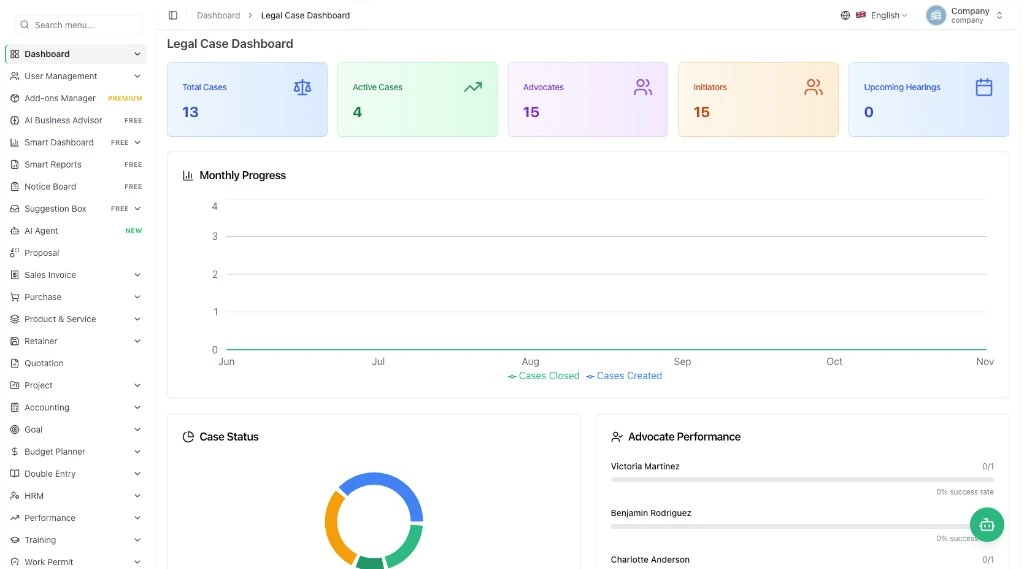
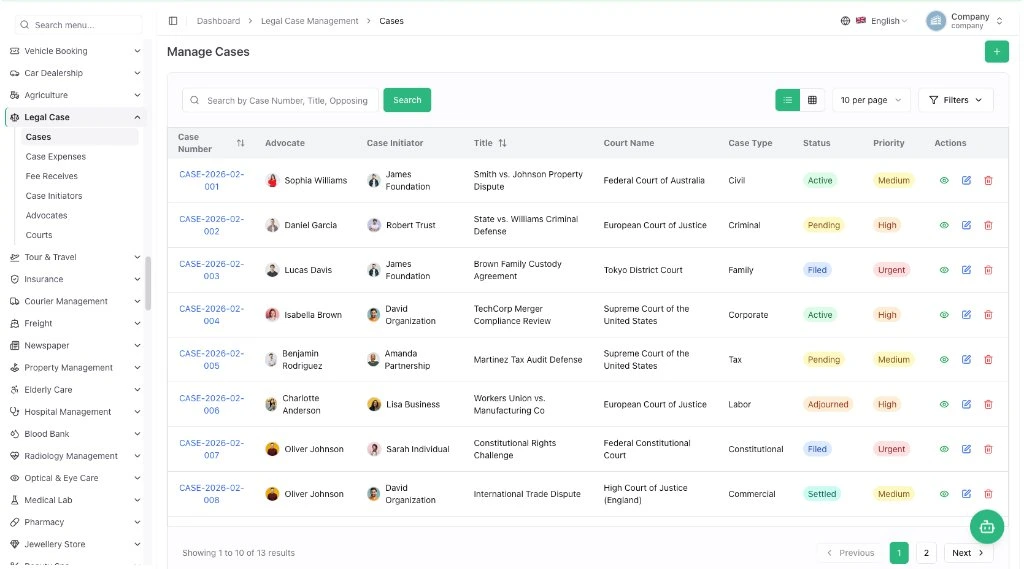
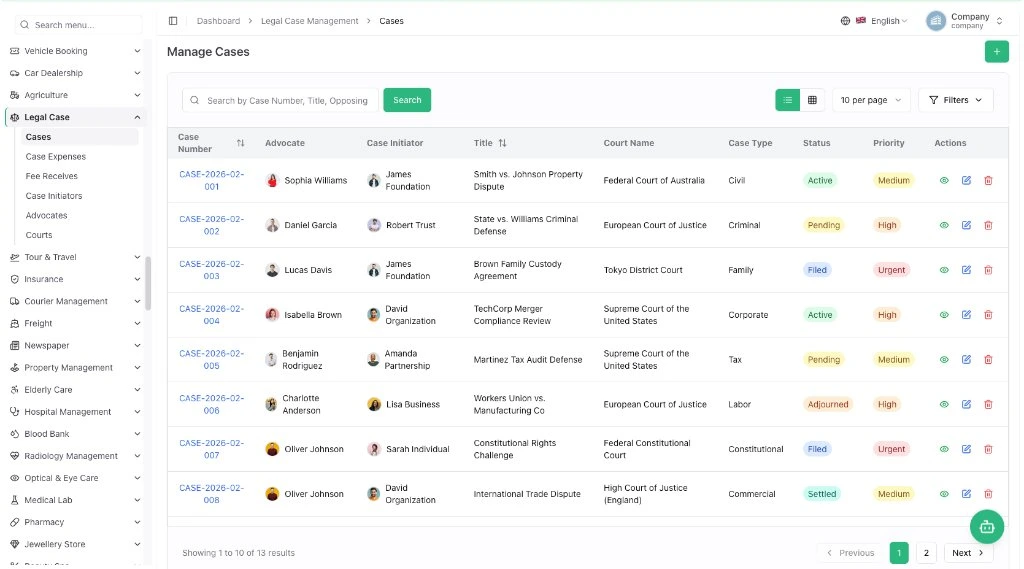
Cases with type, number, year, filing date, parties, FIR number and legal sections, linked to court, advocate and next hearing.
- Court hierarchy setup
- Hearing scheduling with judge and room
- Next hearing auto-updated
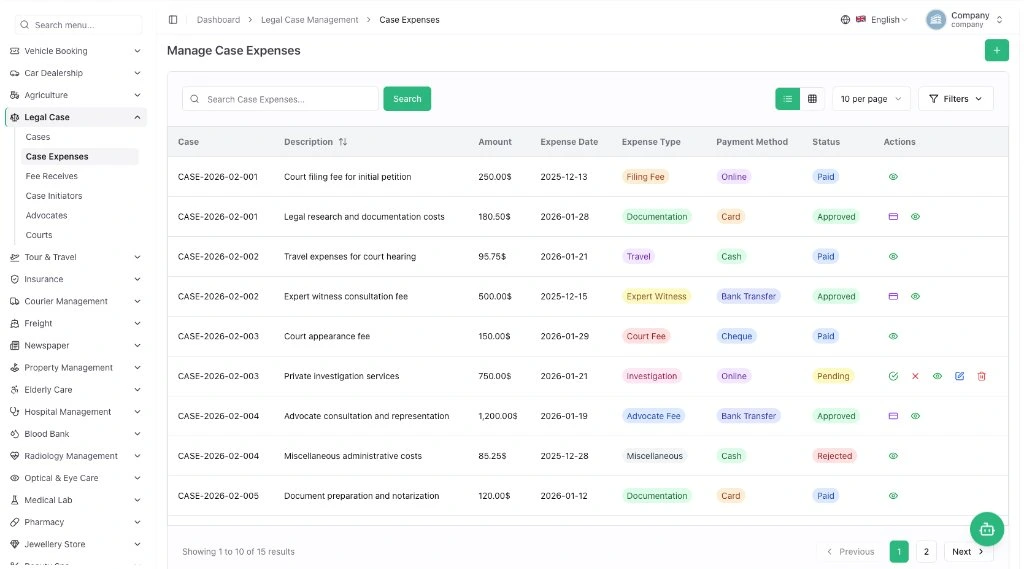
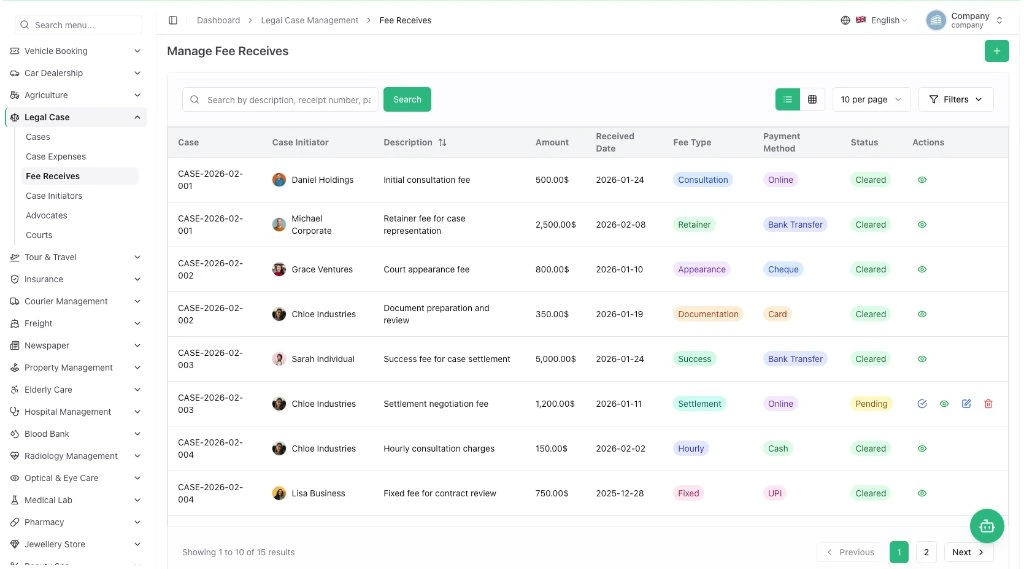
Case expenses and client fee collections with payment method, purpose, receipts and approval workflow.
- Unified expense and fee tracking
- Receipt uploads
- Approval and clearance
Client enquiries, advisory services with required-document checklists, tracked applications and payments.
- Service document checklists
- Application tracking
- Consultation payments
Engagement letters from templates, converted to contracts in one click and signed online by both sides.
- Reusable templates
- Online signatures
- Renewal list
Share files by link or email with optional passwords and see every download's country and device.
- Password-protected links
- Download activity
- Branded download page
Bookable consultations from a shareable link, on a firm calendar synced with Google Calendar.
- Free or paid meetings
- Month, week, day views
- Google Calendar sync
A seamless legal case workflow
Every matter from the first client enquiry to the final fee, in one system your whole firm uses.
Client enquiry
Consultation request logged
Consultation
Booked slot, shared calendar
Case opened
Court, advocate, client linked
Documents & contracts
Templates, files, signatures
Hearings & expenses
Dates, filing and court fees
Fees & closure
Fees cleared, case closed
A day at your law firm, hour by hour
What happens at each hour and which part of the software takes care of it. Nine moments, ten modules, one login. Times are an example.
A new client gets in touch
A caller needs help with a property dispute. You save the enquiry with contact details and the service needed.
The client books a meeting
You send your booking link; the client picks a free slot and answers your questions.
Client papers go on file
ID proof and power of attorney are saved as numbered, private documents.
The engagement letter is signed
Start from a template, convert to a contract in one click, both sides sign online.
The case file is updated
Back from court, add the next hearing date and the court fee paid.
You plan the week
Meetings and work dates in one calendar synced with Google.
Evidence reaches the client safely
A password-protected download link instead of a heavy attachment.
Travel money is settled
The district court trip is claimed, approved online and categorised.
The team stays informed
WhatsApp alerts go out on their own for the events you switched on.
Legal case management for every practice
From solo advocates and boutique firms to corporate legal teams, it adapts to the way you handle matters.
Law Firms
Multi-advocate practices sharing one case list
Solo Advocates & Lawyers
Cases, clients and fees without a back office
Corporate Legal Teams
In-house matters, contracts and company files
Legal Consultants
Advisory work, applications and enquiries
Litigation Practices
Court cases, hearings and case expenses
Family & Property Law
Sensitive client files shared securely
IP & Trademark Firms
Filings, agreements and client documents
Notary Services
Appointments, papers and document records
Legal case management, in detail
The core module centralises legal workflows: advocate and court hierarchy setup, case management, hearing scheduling, expense tracking and invoices, with user-linked advocate profiles and detailed party and legal section records.
Case management
Case type, number, year and filing date, opponent and party details, FIR number and legal sections, status and completion.
- Parties and advocates
- FIR and legal sections
- Status and completion dates
Hearing scheduling
Each hearing linked to its case with judge, courtroom and order sheet. The next hearing date updates automatically.
- Date and time scheduling
- Judge and courtroom
- Attendance and status
Expenses and fees
Expenses and client fees with method, purpose, amount and notes, every transaction linked to a case and user.
- Unified tracking
- Receipts and documents
- Bank account integration
Advocate information
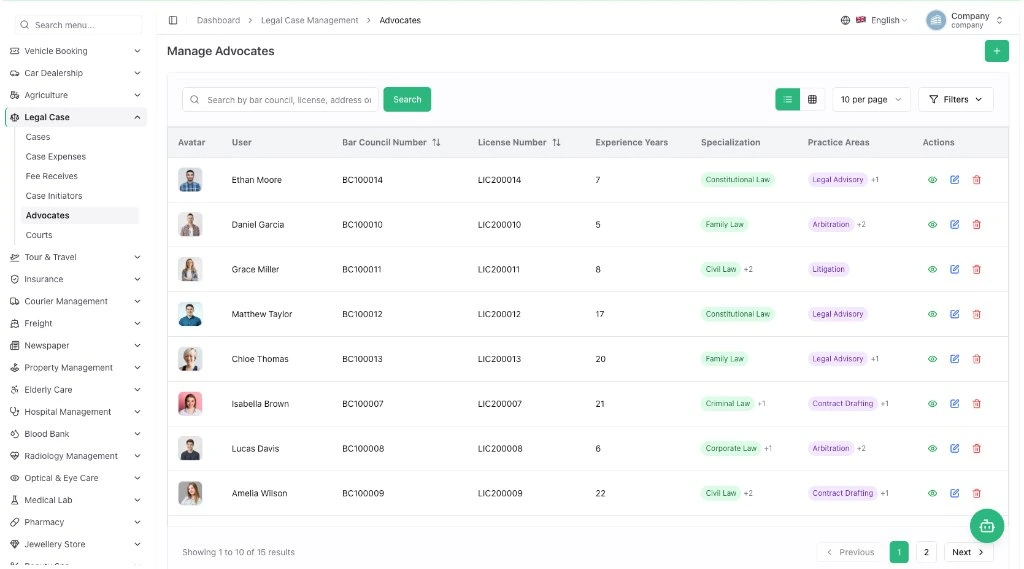
Advocate profiles with bar council and licence numbers, specialisations, practice areas and case history.
- Bar council tracking
- Practice areas
- Performance and case history
Court hierarchy setup
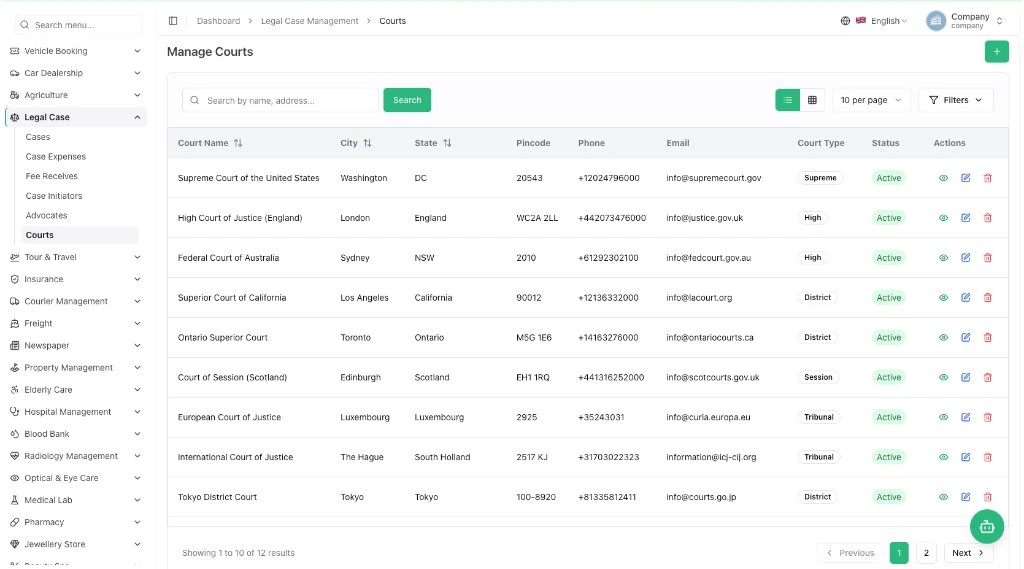
Base courts, high courts and subdivisions with jurisdiction, address and contacts, assigned automatically to cases.
- Flexible court types
- Jurisdiction and address
- Court filtering
Firm knowledge library
Books of articles and mind maps for filing guides, precedents and policies, searchable and shareable.
- Filing guides
- Case law notes
- Firm policies
Guides, precedents and policies on one shelf
Organise firm knowledge into books of articles and mind maps, so every advocate finds the right guide in seconds.
Court Filing Guide
Notes on filing matters, court fees and hearing-day preparation.
- Filing a civil suit, step by step
- Court fee checklist by court type
- Hearing day preparation · mind map
Client Onboarding
How the firm takes on a client, from enquiry to engagement letter.
- New client intake questions
- Engagement letter process · mind map
- Required documents by case type
Case Law Notes
Summaries of rulings and precedents your advocates use often.
- Property dispute precedents
- Family custody rulings summary
- Appeal routes overview · mind map
Contract Terms
Plain-language notes on terms in client and partner agreements.
- Retainer terms explained
- Confidentiality clause notes
- Contract renewal checklist
Firm Policies
The rules every team member follows, readable on day one.
- Conflict check policy
- Client data handling rules
- Office and leave policy
Everything in one library
- Numbered case documents with private or public access
- Contract templates that become live contracts in one click
- Search every book and share a link to any guide
Send case files to clients without risky attachments
Share by secure link or email, lock with a password, and see who downloaded what, from where and on which device.
Link or email sharing
Send a file as a shared link, or assign it to specific email recipients.
Optional password lock
Protect sensitive case papers with a password before they leave the firm.
Download activity
Every download is logged with IP address, country, device and operating system.
Branded and recoverable
Your logo on the download page, and deleted files restore from trash.
16 built-in modules. One complete legal practice system.
Case, client, document, contract and expense modules, fully integrated.
Legal Case Management
Cases with courts, advocates and clients, hearings, documents, expenses, fee receipts and a dashboard of case status and success rates.
Consultancy
Client enquiries, advisory services with document checklists, applications and payments.
Documents
Numbered client and case documents with privacy settings and comments.
Contract
Client and partner contracts with values, renewals and e-signatures.
Contract Template
Reusable engagement letters that convert into contracts in one click.
File Sharing
Links or email with passwords, download tracking and a branded page.
Internal Knowledge
Books of articles and mind maps for guides, precedents and policies.
Appointment
Bookable consultations with a link, days, slots and questions.
Google Calendar
One calendar for appointments, tasks and deadlines.
Petty Cash Management
Floats for court visits and office costs, requests and approvals.
WhatsApp API
Automatic WhatsApp alerts for the events you switch on.
Smart Dashboard Analytics
Live revenue and firm performance.
AI Business Advisor
AI recommendations and growth forecasts for the firm.
Smart Reports
Reports on revenue, expenses and daily activity.
Notice Board
Firm announcements, holiday notices and updates.
Suggestion Box
Anonymous staff suggestions for client service.
A clean screen for every desk in your law firm
Simple for clerks, detailed for advocates and clear for partners.
Updated just now
| Case | Court | Next hearing | Status |
|---|---|---|---|
| CASE-2026-03-007 | Consumer Forum | 18 Nov | Evidence |
| CASE-2026-02-031 | City Civil Court | 14 Nov | Adjourned |
| CASE-2026-04-015 | Labour Court | 25 Nov | Filing |
| CASE-2026-02-010 | District Court, Nashik | 12 Nov | Hearing |
| CASE-2026-01-044 | High Court Bench | 20 Nov | Arguments |
Updated just now
| Case | Court | Next hearing | Status |
|---|---|---|---|
| CASE-2026-02-031 | City Civil Court | 14 Nov | Adjourned |
| CASE-2026-04-015 | Labour Court | 25 Nov | Filing |
| CASE-2026-02-010 | District Court, Nashik | 12 Nov | Hearing |
| CASE-2026-01-044 | High Court Bench | 20 Nov | Arguments |
| CASE-2025-11-102 | Family Court | — | Disposed |
Updated just now
| Case | Court | Next hearing | Status |
|---|---|---|---|
| CASE-2026-04-015 | Labour Court | 25 Nov | Filing |
| CASE-2026-02-010 | District Court, Nashik | 12 Nov | Hearing |
| CASE-2026-01-044 | High Court Bench | 20 Nov | Arguments |
| CASE-2025-11-102 | Family Court | — | Disposed |
| CASE-2026-03-007 | Consumer Forum | 18 Nov | Evidence |
Updated just now
| Case | Court | Next hearing | Status |
|---|---|---|---|
| CASE-2026-02-010 | District Court, Nashik | 12 Nov | Hearing |
| CASE-2026-01-044 | High Court Bench | 20 Nov | Arguments |
| CASE-2025-11-102 | Family Court | — | Disposed |
| CASE-2026-03-007 | Consumer Forum | 18 Nov | Evidence |
| CASE-2026-02-031 | City Civil Court | 14 Nov | Adjourned |
Updated just now
| Case | Court | Next hearing | Status |
|---|---|---|---|
| CASE-2026-01-044 | High Court Bench | 20 Nov | Arguments |
| CASE-2025-11-102 | Family Court | — | Disposed |
| CASE-2026-03-007 | Consumer Forum | 18 Nov | Evidence |
| CASE-2026-02-031 | City Civil Court | 14 Nov | Adjourned |
| CASE-2026-04-015 | Labour Court | 25 Nov | Filing |
Updated just now
| Case | Court | Next hearing | Status |
|---|---|---|---|
| CASE-2025-11-102 | Family Court | — | Disposed |
| CASE-2026-03-007 | Consumer Forum | 18 Nov | Evidence |
| CASE-2026-02-031 | City Civil Court | 14 Nov | Adjourned |
| CASE-2026-04-015 | Labour Court | 25 Nov | Filing |
| CASE-2026-02-010 | District Court, Nashik | 12 Nov | Hearing |
Updated just now
| Case | Court | Next hearing | Status |
|---|---|---|---|
| CASE-2026-03-007 | Consumer Forum | 18 Nov | Evidence |
| CASE-2026-02-031 | City Civil Court | 14 Nov | Adjourned |
| CASE-2026-04-015 | Labour Court | 25 Nov | Filing |
| CASE-2026-02-010 | District Court, Nashik | 12 Nov | Hearing |
| CASE-2026-01-044 | High Court Bench | 20 Nov | Arguments |
SaaS tools, high-end licensed suites, or Legal Case Management?
Most businesses we meet have tried one of the first two. Here is how they compare.
A separate subscription for CRM, accounts, HR, inventory and support.
- Per-user fees for every tool, rising every year
- Data split across apps that don't talk to each other
- Workarounds in Excel to join it all up
- Nobody owns the whole picture
Large ERP suites from global vendors, set up by big implementation partners.
- High licence and implementation cost before go-live
- Projects that run for many months
- Every change needs a consultant
- Features you pay for and never use
Ready software from Involve, set up around your process and run by our team.
- One system for the whole business
- One price for the whole business, unlimited users
- Live in weeks with a phased rollout
- Changes and support from the team that built it
| Many SaaS tools | High-end licensed suites | Legal Case Management | |
|---|---|---|---|
| Cost model | Per user, per app, per month | Licences, implementation and yearly maintenance | One price for the business, unlimited users |
| Cost as you grow | Rises with every new user and app | Rises with users, modules and partner days | Stays predictable |
| Fit to your process | You adapt to each tool | Fits after costly customisation | Configured for your process |
| Time to go live | Fast per tool, slow to join up | Often many months | Weeks, phase by phase |
| Data in one place | No, split across tools | Yes | Yes |
| Changes and support | Vendor tickets for each app | Partner consultants, billed by the day | Our in-house team, in your time zone |
| Your branding | No | Limited | Yes |
| Demo before buying | Trials per tool, on your own | Usually a standard sales demo | Guided demo set up around your process |
General comparison of typical approaches, not of a specific vendor.
Involve Legal Case Management vs the usual options
How we compare with the usual options.
| Involve Legal Case Management | Generic ERP / accounting | Spreadsheets & WhatsApp groups | |
|---|---|---|---|
| Built for legal practices | Needs customisation | ||
| All branches in one system | |||
| Pricing model | Setup + monthly plan, unlimited users | Per user per month | Free, but manual |
| Mobile access for staff | Varies | Chats only | |
| Real-time reports | |||
| Set up and supported by a team | Via partners |
General comparison. Features vary by product and plan.
Live on Legal Case Management in four simple steps
-
1
Book a live demo
30–45 minutes on your process, not a generic tour.
Day 1 -
2
We map and configure
Modules, roles, approvals and reports set up for you.
Week 1–2 -
3
Migrate and train
Your data moved and checked; every team trained.
Week 2–4 -
4
Go live with support
Hypercare after launch, then monthly support.
Week 4+
Screens from projects we built and run
Taken from live client systems. Client data is masked. Open any project to see the problem, what we built and the result.
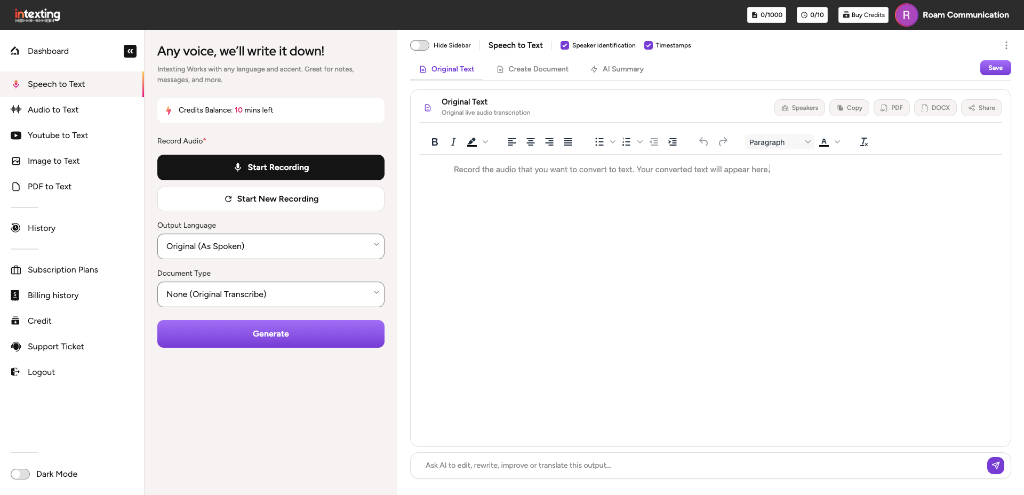

Related work: documents for legal practitioners
Real projects from our clients and products, with the problem, what we built and the outcome.
 Intexting
A registered, certified company behind every product
Involve Digital Technologies Private Limited builds, hosts and supports these products from Nashik, with teams for the UK and the UAE.
The team you will actually work with
No hand-offs to freelancers. The people below lead the audit, the build and the support, from our Nashik office.
Meet the full team NK
 SK
 UW
 MR
 NC
Six commitments, in writing, before you sign
They are part of every proposal for Legal Case Management. After go-live you also get 30 days of free hypercare: anything we built that does not work as agreed is fixed at no cost.
The price in your signed scope is what you pay. Any change needs your written approval first.
The written audit summary is yours to use with any vendor, with no obligation to hire us.
Weekly demos and a written update, so you always know what is done and what is next.
Full source and data export at any time. No lock-in, no hostage hosting.
Every message answered within one business day, with faster response times on Manage plans.
We sign your NDA, or ours, before we see your systems or data.
The complete Legal Case Management Suite, set up and run for you
All 16 modules are included in one suite. Pricing has two simple parts: a one-time setup fee to get you live, and a monthly maintenance plan that keeps everything running. We share a fixed quote after a short requirement call.
One-time setup
Everything needed to launch on your own brand.
- Installation on our managed cloud or your server
- Company, branch, user and role setup
- Your logo, colours and domain
- Data migration from Excel, Tally or your old system
- Team training and go-live support
- Agreed customisation in the project scope
Monthly maintenance
One plan that covers the running costs.
- Domain and SSL certificate
- Cloud hosting with daily backups
- Unlimited users, no per-user fees
- Software updates and security patches
- Priority support by phone, email and WhatsApp
- Uptime and performance monitoring
Customisation and add-ons
When your business needs more.
- New modules, fields, reports and workflows
- Integrations with payments, WhatsApp, Tally or your ERP
- Android and iOS mobile apps
- Dedicated developer hours
Taxes extra. The quote depends on the modules you need, number of branches, data migration and customisation.
See Legal Case Management working on your process
A 30–45 minute live demo with our product consultant. We start with your needs, show the screens that matter to you and explain how we would customise Legal Case Management for your business.
- Tell us about your business Your team, your process and what isn't working today.
- We tailor the demo We set up the modules and examples that match your work.
- See it live and get a plan A walk-through, your questions answered, and a written plan with a fixed quote.
Your legal case management software is one click away
One setup to go live, one monthly plan to keep it running. Installed, branded and supported by Involve Technologies.
- One-time setup and training
- Monthly hosting, domain and support
- Unlimited users
- Priority support
Frequently asked questions
Can it track cases across different courts?
Yes. Set up your court hierarchy once and every case is linked to its court, judge and next hearing date.
Can clients see their documents?
Yes. Share files by secure link or email with optional passwords, and see who downloaded them.
Does it handle fee receipts and case expenses?
Yes. Fees and expenses are recorded per case with receipts and an approval workflow.
Is client data confidential?
Documents can be marked private, access is role-based, and the system runs on a dedicated server for your firm.
How is the software priced?
A one-time setup fee covers installation, configuration, branding, data migration and training. After go-live, a monthly maintenance plan covers domain, hosting, SSL, backups, unlimited users, updates and support. We share a fixed quote after a short requirement call.
Is there a per-user charge?
No. Unlimited users are included in the monthly plan, so you can add staff, branches and clients without the bill changing.
Can you customise it to our process?
Yes. Our in-house developers add fields, workflows, reports, integrations and new modules. Customisation is scoped and quoted separately.
Can you move our existing data?
Yes. We migrate masters and opening balances from Excel, Tally or your current system as part of setup, and check the figures with you before go-live.
Who owns our data?
You do. The system runs on a dedicated server for your business on our managed cloud, or on your own server if you prefer, and you can ask for a full export at any time.
How long does it take to go live?
Most standard rollouts go live in 2 to 6 weeks, depending on modules, branches, data migration and customisation. The timeline is fixed in the quote.
Why businesses choose Involve Technologies
Software, AI and platforms are only half of it. The other half is the team that sets them up for your business and keeps them running.
We audit, build, migrate, train and support. You deal with one team from first call to monthly support.
Our own developers customise and extend what we deliver, so changes do not wait on an outside vendor.
Scope, timeline and monthly plan are written down before work starts.
Hands-on training for admins and staff in English, Hindi and Marathi.
Dedicated environments, backups and full data export whenever you need it.
A monthly Manage plan with a named team that knows your setup.
Let's talk about Legal Case Management Software
Tell us what you need in four quick steps. You get a reply from a consultant, not an auto-responder.
- Free 45-minute discovery call
- Indicative quote on the call
- Mutual NDA on request